Release notes v215 - 19 May 2026
This release introduces 5 customer-visible features focused on the quote review experience, Halo PSA depth, multi-approver workflows, and catalogue quality — plus four new distributor connections.
🧾 Quotes — Collapsible "Review & accept" panel
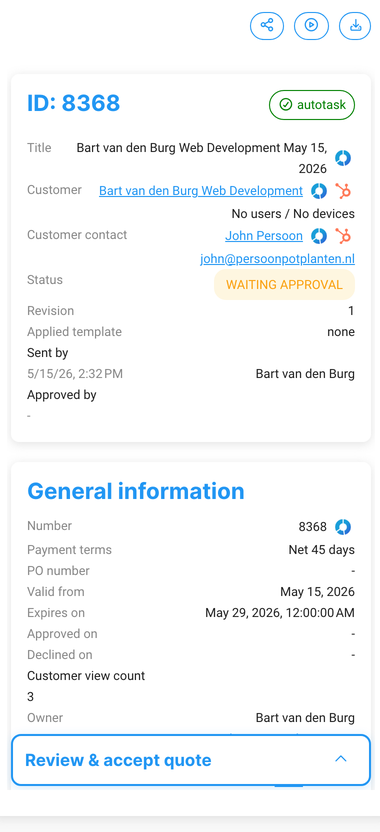
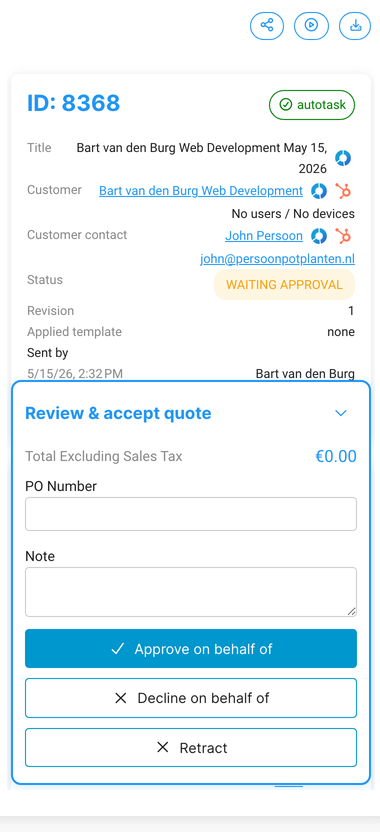
We've reworked the "Review & accept quote" panel in the quote details sidebar so it no longer blocks your view of the quote content. The panel is now a sticky, collapsible bar — collapsed by default so your content is visible, and expandable with one click when you're ready to act.
What this improves
Full quote content visible while reviewing — no more acceptance form covering the screen
Collapse it to review, expand it when you're ready to act — one click, stays where you left it
Cleaner review experience for both team approvals and customer-facing walkthroughs
All existing acceptance functionality (signature, terms, accept button) works exactly as before.
🔐 Quote Approvals — Sequential multi-rule approval
When a quote triggers multiple approval rules, those rules are now processed in order — the first approver signs off before the next one even sees it.


How it works in practice
"All rules in order" — rule 1 approves → rule 2 approves → rule 3 approves → quote goes to the customer.
"Same approver on multiple rules" — Salesbuildr skips duplicates, so the same person isn't asked to approve twice.
"Single rule triggered" — behaves exactly as today; one approver, one email, one approval.
Where to find it: Settings → Quotes → Approval rules — drag ≡ to reorder. Enable "When this rule is met, stop processing other rules" to create conditional chains.
What this improves
Approval rules now match how your team actually works — layered, not parallel
Quotes can no longer skip required approvers when multiple rules apply
Less back-and-forth chasing approvals out of sequence
📦 Catalogue — Products from unlisted manufacturers excluded from quotes
When you unlist or delete a manufacturer, products from that manufacturer are now automatically excluded from the product catalogue search and the marketplace. If you use bulk-add on an opportunity, Salesbuildr shows a warning and skips those products automatically.
What this improves
No more accidentally quoting a product whose brand you no longer carry
Unlisting a manufacturer immediately removes its products from the quoting surface
Bulk-add flows warn you instead of silently including discontinued products
Where to find it: Settings → Products → Manufacturers
🔗 HaloPSA — Quote acceptance note synced back to Halo
When a customer accepts a quote and leaves a note during acceptance, that note is now automatically written back to the linked Halo quotation record. Previously the note was recorded in Salesbuildr but lost in Halo.
What this improves
Acceptance notes from customers are visible in Halo without manual copy-paste
Better traceability — Halo records show exactly what the customer agreed to
Fewer gaps in the audit trail between Salesbuildr and HaloPSA
Automatic for all Halo tenants with quote sync enabled. No configuration required.
🔗 HaloPSA — Optional start date on opportunities
The start date field when creating or editing a Halo opportunity is now optional. Previously, leaving it blank caused sync errors or validation failures.
What this improves
No more forced workarounds when the start date isn't known yet
Importing Halo opportunities with blank start dates no longer fails
Consistent behavior between the Salesbuildr dialog and Halo's own data model
Where to find it: Opportunities → Create new opportunity — "Start date" now shows "Choose a date" and can be left empty.
🛒 Distributors — ALSO (CH), DuxTel (AU), Xit Distribution (AU), and Sektor (NZ) now available
Four new distributor connections are live:
ALSO (CH) — Switzerland
DuxTel (AU) — Australia
Xit Distribution (AU) — Australia
Sektor (NZ) — New Zealand
Settings → Distributors → Connections → click Add Connection.
🛠️ Under the hood
Quotes — the "add items to contract" button has moved next to "create ticket" on won quotes with services, making the post-sale flow easier to find
Quote expiry — quotes now expire at the correct local time for tenants outside UTC
These changes don't add major new functionality, but they reduce friction and improve day-to-day trust in the platform.
🛠️ Stability improvements
Improved sync stability for Autotask, ConnectWise, Halo, HubSpot, and Pax8 integrations
Resolved multiple quote editor issues including post-send editing behaviour and pricing calculations
Improved distributor connection and product pricing reliability across Ingram Micro, A&C, Pax8, and RoutIT
Resolved procurement, product catalogue, and user display issues
These changes don't add major new functionality, but they reduce friction and improve day-to-day trust in the platform.
🔭 In progress
Quote Approvals — full rework — Status visibility, approval audit trail, and richer multi-approver workflows on top of the sequential rule processing shipped this release.
Spreadsheet View for Quotes — UX designs for both the line items grid and the import wizard are finalized; engineering is now picking up implementation.
Previous quoted prices — See what you previously quoted a customer for the same product.
Quote search — Find quotes faster by quote number, ID, or PO number.
Features are subject to change — follow along in the feedback portal for updates.